iPhone Screen Flickering After a Drop? Here is What is Happening Inside
Key Takeaway
If your iPhone screen starts flickering, showing green lines, or registering ghost touches after a drop, the cause is almost always hardware damage inside the display assembly or on the logic board. Software fixes like force restarts rarely solve drop-related screen problems. The faster you get a professional diagnosis, the better the chance of a straightforward repair before secondary damage develops.
You pick up your iPhone and the screen is flashing, glitching, or tapping itself. If this started right after a drop, your phone is telling you something broke inside - even if the glass looks perfectly fine on the outside. As a technician who handles iPhone screen repair cases every day at My Celcare JLT in Dubai, I see this exact situation multiple times a week.
Most people immediately search for a quick fix - a force restart, a settings change, maybe an iOS update. Those searches lead to dozens of articles written by software companies recommending the same five troubleshooting steps. The problem is that those steps almost never fix drop damage. They fix software glitches that have nothing to do with physical impact.
This guide explains what is actually happening inside your iPhone after a drop, how to identify which type of damage you have, and when you genuinely need professional repair versus when a simple restart might actually help.
How to Identify Your Exact Screen Problem
Not all post-drop screen damage looks the same. The specific symptom you see tells me exactly where the damage occurred inside your phone. Here is a breakdown of the most common problems and what each one means.
Screen Flickering or Flashing
The display rapidly switches between bright and dim, or flashes on and off. Sometimes the flickering is constant. Other times it only appears at certain brightness levels or when you tilt the phone. This typically points to a loose display connector or a damaged backlight circuit on the logic board.
Ghost Touch and Phantom Inputs
Your iPhone opens apps by itself, types random characters, scrolls without your finger on the screen, or makes selections you did not tap. Ghost touch means the digitizer layer - the part of the display that senses your finger - is damaged or receiving false electrical signals. I have seen phones call contacts, change settings, and even factory reset themselves because of unchecked ghost touch.
Green, Pink, or White Lines
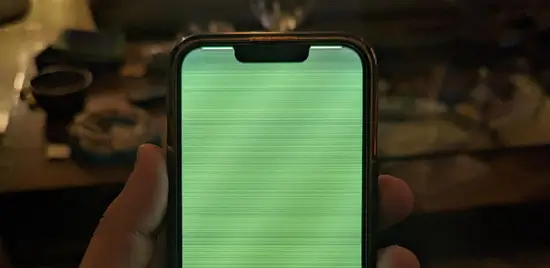
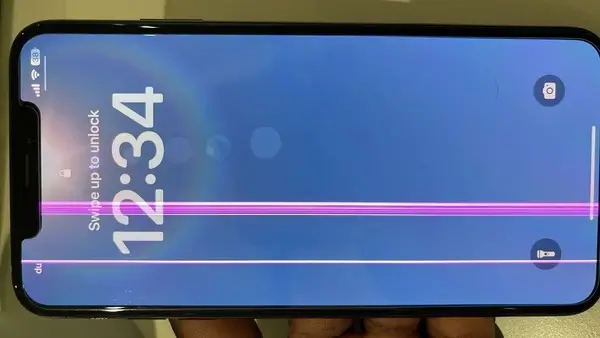
A single line or multiple lines run vertically from the top to the bottom of the screen. On OLED iPhones (iPhone X and later), this almost always means the organic compound layer inside the display cracked at the point of impact. These lines cannot be fixed with software. The OLED panel needs full replacement.
Black Spots or Ink Bleed
Dark patches appear on the screen and slowly spread over hours or days. This is liquid crystal or OLED material leaking from a fractured display panel. The damage is progressive - it gets worse over time even without further impact. If you notice dark spots forming, get the phone to a repair shop before they spread across the entire display.
Partial or Full Screen Unresponsiveness
Part of the screen stops responding to touch, or the entire display goes completely unresponsive while still showing an image. The display connector may have partially dislodged, or the digitizer flex cable sustained a micro-fracture at the fold point where it bends around the edge of the phone.
Screen Works but Display is Distorted
Colors look wrong, the image appears stretched, or certain areas show a yellow or green tint. This indicates damage to specific OLED sub-pixels or a partially fractured display driver connection. Touch still works normally because the digitizer is fine, but the visual output is compromised.
Quick Diagnostic Guide
- Flickering that changes when you press the screen edges = Loose display connector (often repairable without full screen replacement)
- Constant flickering regardless of pressure = Internal panel damage or backlight IC failure (screen replacement or board repair needed)
- Green or colored lines top to bottom = Cracked OLED panel (screen replacement required)
- Random phantom touches = Damaged digitizer layer (screen replacement required)
- Spreading dark spots = Leaking display material (screen replacement required - do not delay)
- Half the screen unresponsive = Flex cable micro-fracture or connector issue (diagnosis needed)
What is Happening Inside Your iPhone After a Drop
Your iPhone display is not a single piece of glass. It is a layered assembly with multiple components that all need to work together. Understanding this structure explains why drops cause such varied symptoms.
The Display Assembly - Layer by Layer
From the outside in, your iPhone screen consists of:
- Cover glass - The outer Ceramic Shield or hardened glass that you touch
- Digitizer - A transparent capacitive touch sensor that detects finger positions
- OLED or LCD panel - The actual display that produces the image
- Backlight - Present only on LCD models (iPhone 8, SE), provides illumination behind the LCD
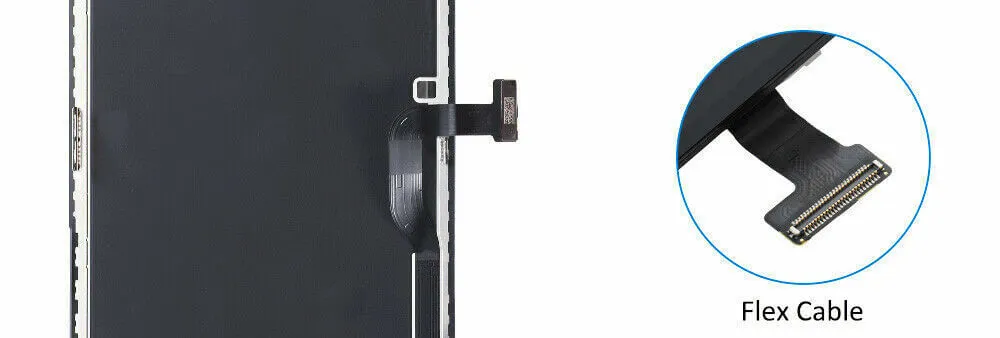
- Flex cable - A thin ribbon cable that connects the display assembly to the logic board
- Display connector - The physical plug where the flex cable meets the logic board
A drop can damage any one of these layers independently. That is why you can crack the OLED without cracking the glass, lose touch function while the image looks perfect, or have a flawless display that flickers because the connector came loose.
Why OLED Screens Show Different Damage Than LCD
Every iPhone from the iPhone X onward uses an OLED display. OLED panels are thinner, more flexible, and produce better colors than LCD - but they are also more fragile internally.
When an LCD screen takes impact, it typically cracks in a web pattern and the backlight bleeds through. The damage is usually obvious and uniform.
OLED damage is different. The organic light-emitting compounds sit in an ultra-thin layer that can fracture invisibly. You get a phone with a perfect-looking glass surface, but green lines running through the display, or half the screen showing dead pixels. I open these phones and find zero visible damage to the glass, yet the OLED layer underneath is cracked across its entire width.
The Flex Cable - The Most Underestimated Failure Point
The display flex cable is a paper-thin ribbon that carries all display and touch data between the screen assembly and the logic board. It folds around a tight bend at the bottom of the phone. A drop creates a sudden shock wave that can micro-fracture the copper traces inside this cable without any visible external damage.
A damaged flex cable produces some of the most confusing symptoms: intermittent flickering, touch that works sometimes and fails other times, or a screen that functions normally until you apply slight pressure near the bottom edge. I see flex cable damage in roughly one out of every five drop-related screen repairs.
6 Technical Causes of Screen Problems After a Drop
Based on thousands of repairs at My Celcare JLT, these are the six most common hardware failures that cause post-drop screen issues, ranked from most to least frequent.
1. Dislodged Display Connector
The impact pops the display flex cable partially out of its socket on the logic board. This is the best-case scenario because a technician can often reseat the connector without replacing any parts. Symptoms include intermittent flickering, a screen that cuts to black and comes back, or touch that drops out briefly.
2. Internal OLED or LCD Panel Fracture
The display panel cracks internally while the outer glass stays intact. This produces green or pink lines, dead pixel clusters, ink bleed, or sections of the display that show no image at all. A full display assembly replacement is the only fix.
3. Digitizer Damage
The touch-sensitive layer separates, cracks, or develops electrical faults. This causes ghost touch, unresponsive zones, or erratic touch behavior. Since the digitizer is bonded to the display panel in modern iPhones, fixing this requires a complete screen replacement.
4. Flex Cable Micro-Fracture
Microscopic breaks in the copper traces inside the flex cable create intermittent connections. The screen may work perfectly at one angle but fail when the phone is flat on a table. These fractures are invisible to the naked eye and require magnification to diagnose. The fix is a display assembly replacement since the flex cable is permanently attached to the screen.
5. Backlight IC or Display Driver Damage
The impact shock can crack the solder joints under the backlight IC or display driver chip on the logic board itself. This causes dim or uneven backlighting, a completely dark screen that still responds to touch, or flickering that persists even after a new screen is installed. This is a board-level repair that requires micro-soldering on the logic board - a screen replacement alone will not fix it.
6. Internal Screw and Bracket Loosening
Small metal brackets and screws hold the display connector in place on the logic board. A hard drop can strip or loosen these screws, allowing the connector to shift and make intermittent contact. This is another best-case scenario that a skilled technician can fix by tightening or replacing the bracket hardware.
Important: Causes 1 and 6 are the only ones that do not require a new screen.
If your symptoms point to causes 2, 3, or 4, you need a display assembly replacement. If cause 5 applies, you need board-level micro-soldering repair. A proper diagnosis before repair prevents you from paying for parts you do not need.
Symptom to Cause: A Quick Diagnostic Table
Different symptoms point to different layers of the display stack, and the layer decides whether this is a screen job or a logic board job. Find what your iPhone is doing in the left column before you book anything.
| What you are seeing | Most likely cause | Urgency | What actually fixes it |
|---|---|---|---|
| Flickering or flashing, worse when the phone is warm | Display connector has shifted in its socket, or the display driver IC is failing | Urgent | Reseating the connector sometimes fixes it. If the driver IC is at fault the assembly is replaced. |
| Ghost touch, phantom taps, typing on its own | Digitizer layer cracked or its flex is partly detached | Urgent - the phone can act on its own | Display assembly replacement. No software fix exists for a cracked digitizer. |
| Green, pink or vertical coloured lines | OLED panel fractured internally, or a row driver has lost contact | Permanent, will spread | Assembly replacement. Lines never recede on their own. |
| Black ink-like blot that grows daily | OLED layer punctured and the organic material is bleeding | Spreads fast in heat | Replace quickly. The blot expands until it covers the panel. |
| A dead strip or unresponsive area | Digitizer flex micro-fractured under the bezel | Moderate | Assembly replacement after connector testing. |
| Screen dark but the phone rings and vibrates | Backlight circuit or backlight IC damaged on the logic board | Board-level, not always the screen | Diagnostic first. A new screen alone will not fix a backlight IC fault. |
| Flickering that comes and goes with temperature | Micro-fracture opening and closing as metal expands | Will become permanent | Do not wait for it to settle. Intermittent faults become constant. |
One distinction matters more than any other here. If the display lights up at all, even flickering or distorted, the backlight circuit is usually intact and a display assembly replacement will resolve it. If the panel stays black while the phone still rings, vibrates and responds to touch in the right places, the fault is more likely on the logic board, and fitting a new screen would change nothing. That is why a free diagnostic before quoting matters: the two look identical to the owner and cost very different amounts to repair.
Software Fixes You Can Try First
I will be honest with you. If your screen problem started immediately after a physical drop, software fixes have less than a 5% chance of resolving it. But they take two minutes and cost nothing, so they are worth trying before you visit a repair shop.
Force Restart Your iPhone
A force restart clears the system memory and reloads the display drivers. It can resolve a software glitch triggered by the impact vibration, but it cannot fix a loose connector or cracked panel.
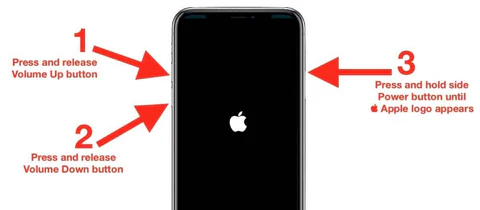
How to force restart:
- iPhone 8 and later: Press and quickly release Volume Up, press and quickly release Volume Down, then press and hold the Side button until the Apple logo appears
- iPhone 7: Hold Volume Down and the Sleep/Wake button simultaneously until the Apple logo appears
- iPhone 6s and earlier: Hold the Home button and the Sleep/Wake button simultaneously until the Apple logo appears
Disable Auto-Brightness
Go to Settings, then Accessibility, then Display and Text Size, and turn off Auto-Brightness. In rare cases, a drop can damage the ambient light sensor, causing the auto-brightness system to send erratic signals that look like flickering. Disabling it removes that variable.
Check for iOS Updates
Go to Settings, then General, then Software Update. Apple occasionally releases display driver updates that improve compatibility. This will not fix physical damage, but it eliminates software as a potential contributing factor.
When to Stop Troubleshooting and Get Professional Help
Do not waste time on software fixes if you see any of these signs:
- Green, pink, or white lines running across the screen
- Dark spots that are growing or spreading
- Ghost touch that causes the phone to perform actions on its own
- Half or more of the screen is completely unresponsive to touch
- The screen went black immediately after the drop but the phone still vibrates and makes sounds
- Flickering that gets worse when you press near the edges of the display
Every one of these symptoms indicates hardware damage. No force restart, factory reset, or iOS update will fix them. A factory reset will only erase your data without solving the underlying problem.
What Happens During Professional Screen Repair
When you bring a phone with post-drop screen issues to My Celcare JLT, here is exactly what we do - step by step.
Free Diagnostic Assessment
We start with a full visual and functional test. I check every part of the screen for dead zones, flickering patterns, touch accuracy, and color reproduction. Then I open the device and inspect the display connector, flex cable, and logic board under magnification. This tells me whether you need a connector reseat, a screen replacement, or a board-level repair - before you spend any money.
Display Assembly Replacement
If the panel, digitizer, or flex cable is damaged, we replace the entire display assembly with a genuine OEM unit. This includes the OLED or LCD panel, digitizer, and new flex cable - all factory-bonded as a single piece.
Face ID and True Tone Preservation
This is where many repair shops fail. Face ID on iPhone X and later relies on a flood illuminator, infrared camera, and dot projector housed in the earpiece assembly at the top of the screen. During a screen replacement, we carefully detach these components from the old display and transfer them to the new one. If this step is done incorrectly, Face ID stops working permanently.
We also calibrate True Tone to the new display so your screen maintains accurate color temperature across different lighting conditions.
Post-Repair Testing
After reassembly, we run a complete function test: full-screen touch mapping, Face ID verification, True Tone calibration check, proximity sensor, ambient light sensor, earpiece audio, and front camera. The phone does not leave our bench until every function passes.
How Much Does It Cost, and How Long Does It Take?
Screen price tracks panel technology rather than phone age. Pro models use LTPO OLED panels with higher refresh rates and more complex driver circuitry, which is why the gap between a Pro and a standard model is wider than most people expect. These are published starting prices for iPhone screen repair in Dubai:
| iPhone model | Screen replacement from |
|---|---|
| iPhone 16 Pro Max | 1,890 AED |
| iPhone 16 Pro | 1,575 AED |
| iPhone 15 Pro Max | 1,470 AED |
| iPhone 15 Pro | 1,365 AED |
| iPhone 14 Pro Max | 1,365 AED |
| iPhone 14 Pro | 1,155 AED |
| iPhone 13 Pro Max | 1,155 AED |
| iPhone 13 Pro | 1,050 AED |
| iPhone 12 Pro Max | 630 AED |
| iPhone 12 Pro | 580 AED |
| iPhone 12 | 525 AED |
Standard and Plus models, the Mini, and the newest iPhone 17 range are quoted on enquiry because panel supply moves week to week. Most display assembly replacements are completed the same day, and often within about an hour once the part is in stock, because the job is a controlled swap rather than an investigation.
Two things change the figure. If the diagnostic finds the fault sits in the backlight circuit or the display driver on the logic board rather than in the panel, that is board-level work quoted separately, and a screen alone would not have fixed it. And if the same drop bent the frame, the assembly will not seat flat against a distorted chassis, so the frame has to be trued first or the new screen will fail early.
What You Should Know Before Getting Your Screen Replaced
Screen replacement is the most common iPhone repair, but not all screen replacements deliver the same result. Here is what separates a quality repair from a problematic one.
OEM vs Aftermarket Screens
OEM (Original Equipment Manufacturer) screens match Apple factory quality - same OLED brightness, color accuracy, and touch sensitivity. Aftermarket screens come in tiers: hard OLED, soft OLED, and LCD replacements for OLED phones. Each tier drops in quality and longevity. At My Celcare JLT, we use genuine OEM display assemblies because they deliver the same experience as the original screen.
The Apple Non-Genuine Part Warning
After any third-party screen replacement, iOS displays a message in Settings saying "Unable to verify this iPhone has a genuine Apple display." This message appears regardless of screen quality and does not affect phone functionality. It is an Apple policy notification, not an indication of repair quality.
Your Data is Safe
A screen replacement does not touch your data. Your photos, messages, apps, and settings remain exactly as they are. There is no need to back up specifically for a screen repair, although regular backups are always a good practice.
Why Dubai Heat Makes Post-Drop Screen Damage Worse
Living in Dubai adds an extra layer of urgency to screen damage. The extreme heat here accelerates every type of post-drop screen problem.
Dubai summer temperatures regularly exceed 45 degrees Celsius. If your iPhone has a micro-fracture in the OLED panel or a partially dislodged connector, heat causes the materials to expand and contract with each temperature cycle - from air-conditioned interiors to outdoor heat. This thermal cycling widens cracks, loosens connections further, and turns minor damage into major failure within days.
I see this pattern constantly during summer months. A customer drops their phone, notices minor flickering, decides to live with it, and then comes in a week later with a completely dead display. The Dubai heat turned a simple connector reseat into a full screen replacement.
If you notice any screen symptoms after a drop in Dubai, do not wait. The heat will make it worse.
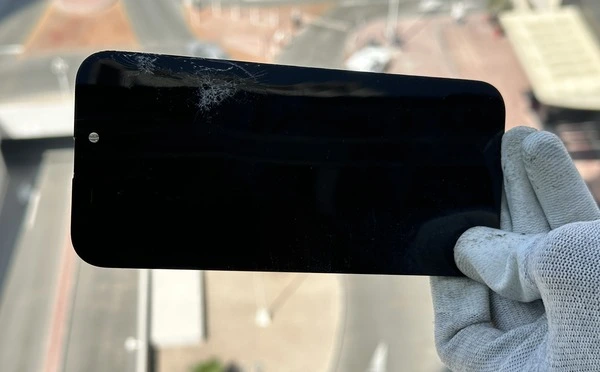
How to Protect Your iPhone Screen from Drop Damage
Prevention is always cheaper than repair. Here are the most effective ways to protect your iPhone screen based on what I see on the repair bench every day.
- Use a case with raised edges. The case lip should extend at least 1 to 2 millimeters above the screen surface. This prevents direct glass-to-ground contact during a face-down drop. MagSafe-compatible cases with military-grade drop ratings offer the best protection.
- Install a tempered glass screen protector. Tempered glass absorbs impact energy and cracks instead of your display. A 20 AED screen protector can save you a 600+ AED screen replacement. Replace it immediately after any crack.
- Avoid using your phone near pool edges and balconies. These are the two most common drop locations I hear about at our shop. Wet hands near a pool and one-handed use on a balcony lead to the most severe drops.
- Do not carry your phone in a back pocket. Sitting on your phone bends the display assembly and weakens the flex cable connection over time, making it far more vulnerable to drop damage later.
