Is Your iPhone Battery Health Below 80%? Here is What You Need to Know
By My Celcare JLT | Published | Updated
What Is iPhone Battery Health?
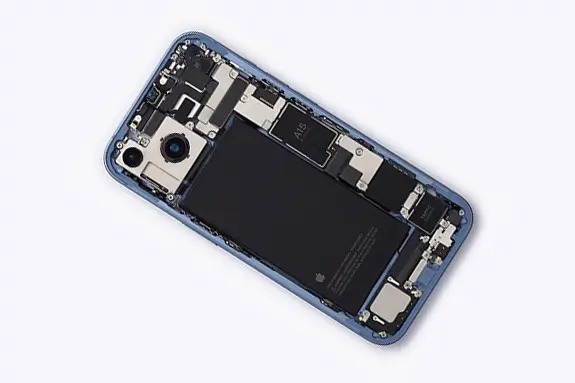
Every iPhone ships with a lithium-ion battery. Over time, this battery loses its ability to hold a full charge. Apple tracks this through a metric called Maximum Capacity, which you will find under your battery settings.
When your iPhone is brand new, that number sits at 100%. It means your battery can hold its full designed charge. As months and years go by, chemical aging reduces that capacity. A phone showing 85% maximum capacity, for example, can only hold 85% of the charge it could when it was new.
This is not a defect - it is just how lithium-ion batteries work. Every charge cycle wears the battery down slightly. But the speed at which it drops depends heavily on how you use and charge your phone.
How to Check Your iPhone Battery Health
It takes about five seconds. Here is how:
- Open Settings
- Tap Battery
- Tap Battery Health and Charging
- Look at Maximum Capacity - that is your battery health percentage
You will also see whether your iPhone has Peak Performance Capability enabled or if performance management has kicked in. More on that in a moment.
What the Numbers Actually Mean
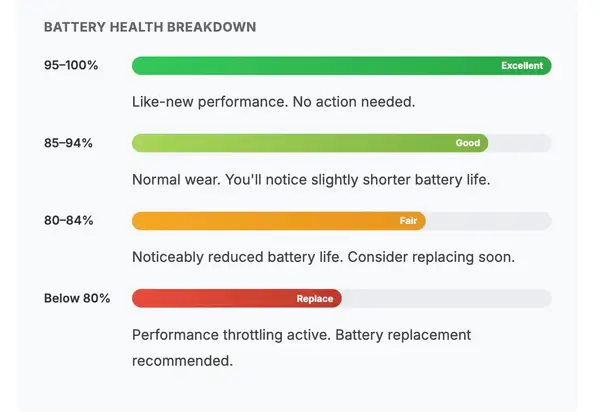
Not every percentage drop is a cause for panic. Here is a practical breakdown of what your battery health number tells you:
95 to 100% (Excellent)
Your battery is performing like new. No action needed. Just keep following good charging habits to stay in this range as long as possible.
85 to 94% (Good)
This is normal wear for a phone that has been used for a year or two. You might notice your battery draining a bit faster than it used to, but overall performance stays solid.
80 to 84% (Fair)
Now you are entering the zone where the difference becomes noticeable. Your phone will not last as long on a single charge, and you will probably find yourself reaching for the charger more often. This is a good time to start thinking about a battery replacement.
Below 80% (Replace)
This is the threshold Apple considers significant. Once your battery drops below 80%, your iPhone may activate performance throttling to prevent unexpected shutdowns. Battery replacement is strongly recommended at this stage.
What Happens When Battery Health Drops Below 80%?
This is the part most people do not fully understand, and it matters.
When your iPhone battery health falls below 80%, Apple built-in performance management system can start throttling your device. That means your phone intentionally slows itself down to prevent the degraded battery from causing sudden shutdowns.
You might experience slower app launches, lower frame rates while scrolling, reduced speaker volume, dimmer screen brightness in some cases, and longer camera launch times. Your iPhone is not broken - it is protecting itself. But the trade-off is a noticeably sluggish experience that gets worse as the battery continues to degrade.
Apple introduced this feature after the well-known "batterygate" controversy, where iPhones with aging batteries were shutting down without warning. Performance management was their solution - slow the phone down rather than let it crash.
The catch? Many people mistake this throttling for their phone getting old. They assume it is time to buy a new iPhone when, in reality, a simple iPhone battery replacement can bring it back to full speed.
Why Does iPhone Battery Health Drop So Fast?
If your battery health is dropping faster than expected, your daily habits are likely the biggest factor. Here are the most common reasons:
Heat exposure is the number one battery killer. Charging your iPhone in direct sunlight, leaving it on your car dashboard in summer, or using processor-heavy apps while charging all generate excessive heat. Lithium-ion batteries degrade much faster in high temperatures, and in a place like Dubai where temperatures regularly hit 45 degrees and above, this is an even bigger concern.
Frequent full charge cycles also speed up degradation. Draining your battery to 0% and charging it back to 100% repeatedly puts more stress on the cells than keeping your charge between 20% and 80%.
Using cheap or uncertified chargers can deliver inconsistent power to your battery, causing long-term damage. Always use MFi-certified accessories or the original Apple charger.
Overnight charging every night used to be a bigger issue, but Apple Optimized Battery Charging feature has helped. Still, if you have disabled this feature or if it is not working properly, leaving your phone plugged in at 100% for hours is not ideal.
Heavy daily usage - gaming, video streaming, GPS navigation, and running multiple apps simultaneously - pushes your battery through more charge cycles in less time.
Can You Improve iPhone Battery Health?
Let us be real - you cannot reverse battery degradation. Once that maximum capacity drops, it is not coming back up. No app, no setting, and no trick will restore lost capacity.
But you can absolutely slow down future degradation with a few smart habits:
- Keep your iPhone out of extreme heat
- Avoid using it while it charges, especially for demanding tasks
- Enable Optimized Battery Charging in your settings - it learns your daily routine and delays charging past 80% until you actually need it
- Try to keep your charge level between 20% and 80% as much as possible
- Use genuine or MFi-certified charging accessories
- Update to the latest iOS version, as Apple frequently optimizes battery performance through software updates
These habits will not fix a battery that has already degraded, but they will help your current or replacement battery last significantly longer.
Should You Replace Your iPhone Battery?
If your battery health is below 80%, the answer is almost always yes - especially if you are experiencing throttling, frequent shutdowns, or constantly running out of charge by midday.
A battery replacement is far more cost-effective than buying a new iPhone. It restores your phone original performance, eliminates throttling, and gives you a full day of battery life again. For most people, it adds another two to three years of usable life to their device.
You have two options for replacement. Apple official service is one route, though it tends to be more expensive and may require you to part with your phone for a few days. The other option is a trusted iPhone repair center that uses high-quality replacement batteries and can often complete the job the same day.
When choosing a repair provider, make sure they use quality cells that match or exceed Apple original specifications. Ask about warranty coverage on the replacement. And verify that the repair will not void any remaining warranty or compromise your phone water resistance - reputable repair shops know how to handle this properly.
When Should You Just Get a New iPhone Instead?
Battery replacement makes sense for most iPhones that are still within a few years of their release. But there are situations where a new phone is the smarter investment.
If your iPhone is five or more years old and no longer receiving iOS updates, a new battery will not solve the bigger issue - you will be stuck on outdated software that misses out on security patches and new features. Similarly, if your phone has other hardware problems like a cracked screen, faulty charging port, or speaker issues on top of a dead battery, the combined iPhone repair cost might push you closer to new-phone territory.
For iPhones that are two to four years old with no other issues, a battery replacement is almost always the right call.
The Bottom Line
Your iPhone battery health dropping below 80% is not the end of the world - but it is definitely a signal that you need to act. Performance throttling, short battery life, and unexpected shutdowns are all signs that your battery has reached the point where replacement makes sense.
Do not assume you need a brand-new phone. A professional iPhone battery replacement can make your iPhone feel new again, save you a significant amount of money, and keep your device running strong for years to come.
Check your battery health today. If that number is sitting at 80% or below, it is time to do something about it.
